v0.5.5

Download Corrigo

Desktop, browser, and phone — same account. Check the SHA-256 after a desktop download so you know the file matches the build we published.

Your system

macOS

macOS 13 Ventura or later · Apple Silicon and Intel · 2.6 MB

Download DMG

Open the DMG and drag Corrigo into Applications. The build is signed and notarized by Apple — macOS may ask once to confirm you want to open it.

SHA-256

c8981d9dd771c776634ac58fa56d285e9c51995654f632dad16dbdada3a83a30

Release notes

How Corrigo grew — from a simple Mac corrector to the product you download today.

  1. v0.5.5

    6 Sep 2026

    Current

    Windows is back on the download page, the browser extension is downloadable, and every client now behaves like the iPhone app. Mac stays on 0.5.4.

    Windows 0.5.5

    • New installer (Velopack). Check for Updates in Settings now works against corrigo.me/releases/windows.
    • Account tab shows when a Pro trial ends and turns the usage bar orange under 20% remaining.
    • “Send new code” in the Account tab and in onboarding, so an expired code no longer means a restart.
    • Locked Translate reads “Translate is included on Pro and Max.” in account mode.
    • Own-key mode no longer tells the model your German or Latin-script Serbian text is English.
    • Not code-signed yet — SmartScreen may warn on first run.

    Browser extension 1.0.1

    • Downloadable ZIP for Chrome and Edge (Load unpacked) while the store listings are reviewed.
    • Sign-in copy no longer mentions a 14-day trial — new accounts start on Free.
    • Translate loads together with Correction and Rephrase on plans that include it.
    • “Already flawless” follows the iPhone rule; quota and signed-out messages match the apps.
    • Devices list marks this browser; removing it signs you out.

    Android 0.5.5

    • Keyboard works on the selected text when there is a selection, and Insert replaces only that.
    • Last Translate language is remembered in the app and in the keyboard.
    • Readable errors instead of codes, Upgrade buttons on locked tones and Translate.
    • Account refreshes when you return to the app after six hours.
  2. v0.5.4

    29 Aug 2026

    New accounts start on Free. Hosted AI on every plan. Own keys stay on Max.

    What this version adds

    • Free 20,000 tokens a day, Pro 200,000 a day, Max unlimited. Unused tokens do not roll over.
    • New accounts start on Free — no card and no 14-day Pro trial.
    • Own API keys and local models are Max-only. Free and Pro use Corrigo’s hosted AI.
    • Settings shows tokens used today, not a monthly bar.
  3. v0.5.2

    20 Aug 2026

    One account, hosted AI if you want to start in a minute, or your own keys if you want the request to go nowhere near us.

    What this version adds

    • Sign in with email. New accounts start on Free — no card, no API key.
    • Hosted AI so correction, rephrase, and translate just work. On Max you can still paste your own keys.
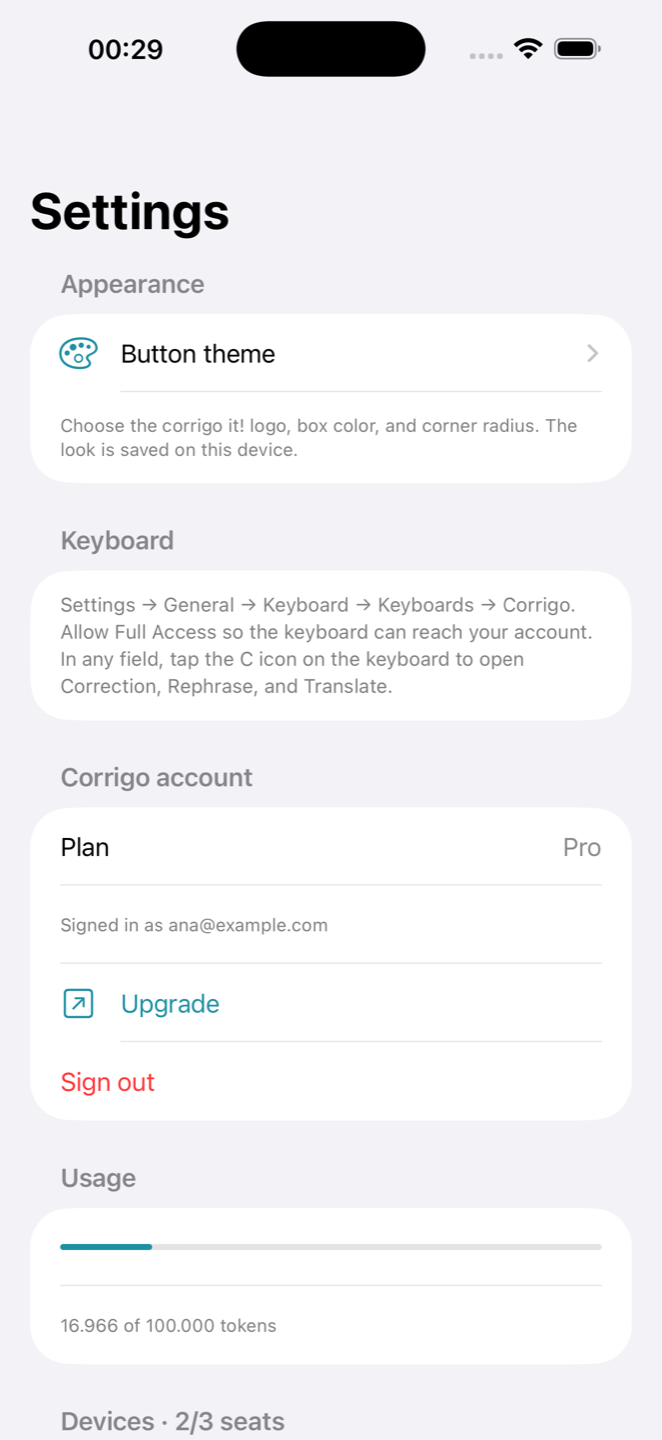
    • Account view: plan, usage, the machines you are signed in on, sign out.
    • A quiet notice when you pass 80% and 100% of the allowance.
    • The app keeps working for a short time offline, then asks you to reconnect.
    • Android APK on the download page (sideload) and iPhone screens so you can see the mobile app.
  4. v0.5.0

    Corrigo became something you take with you. History, templates, and the same preferences on every machine.

    What this version adds

    • Correction history — reopen a past fix, restore it, keep the list on the device or sync it.
    • Templates: support reply, standup, house style. Save a format and apply it in one click.
    • One account on Mac, Windows, and phone. Shortcuts and preferences travel with you.
    • Free, Pro, and Max plans with a clear token limit.
  5. v0.4.0

    You choose the model. Keys stay on your machine. A local model never has to leave it.

    What this version adds

    • Connect OpenAI, Anthropic, Gemini, a custom endpoint, or a local model such as Ollama.
    • API keys live in the Keychain (or Windows DPAPI). We do not store them on a server.
    • Local endpoint option — text can stay on this Mac.
    • The request goes from your device to your provider. We are not in the middle when you use your own key.
  6. v0.3.0

    Translate the sentence you already wrote. Same field. Any language.

    What this version adds

    • Translate tab — pick a target language, see the result, Replace.
    • Not a shortlist. Write in one language, send in another.
    • Correction still keeps the language you typed in, when you are not translating.
  7. v0.2.0

    Faster, quieter, and on Windows too. Skip the bubble when you want. Rephrase in three voices.

    What this version adds

    • Windows: same bubble, Ctrl+Shift+G, tray app.
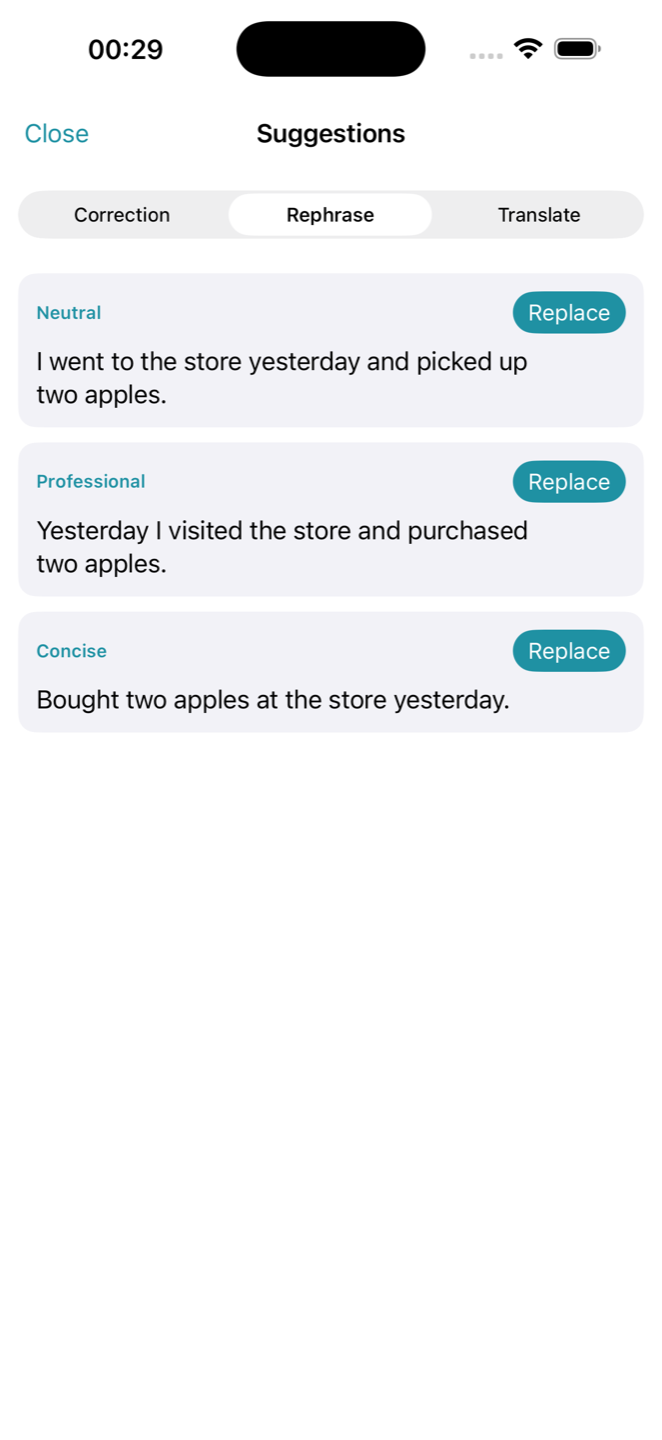
    • Three rephrase tones — Neutral, Professional, Concise.
    • Global shortcut. Hide the bubble and still open Corrigo from the keyboard.
    • Macros: save an action and run it with one shortcut every time.
    • Clipboard-safe paste for apps that will not take a normal replace.
    • Per-app blocklist. Password fields and terminals stay off.
  8. v0.1.0

    The first public Corrigo. A small Mac app that fixed the sentence you were already writing — nothing more.

    What shipped

    • A bubble next to the text field. Click it, see the correction, hit Replace.
    • Changed words highlighted. If the sentence was already fine, Corrigo said so.
    • The fix went back into the same field. No chatbot window. No copy-paste.
    • Undo for a few seconds after Replace.
    • Worked in the apps you already type in — Mail, Slack, Chrome, Notes, and the rest.
    • Your own OpenAI key. Text left the Mac only when you asked.
    • Idle until you click. Nothing captured while you type.

iPhone

Same account. A C icon on the keyboard.

Corrigo on iPhone signs in with the same email as Mac and Windows. Tap the C icon for Correction, Rephrase, and Translate. Scroll the loop — these are the screens that will ship.

01

Enable the keyboard

Turn Corrigo on once in iOS Settings. After that, the C icon sits above the keys in every app you type in.

02

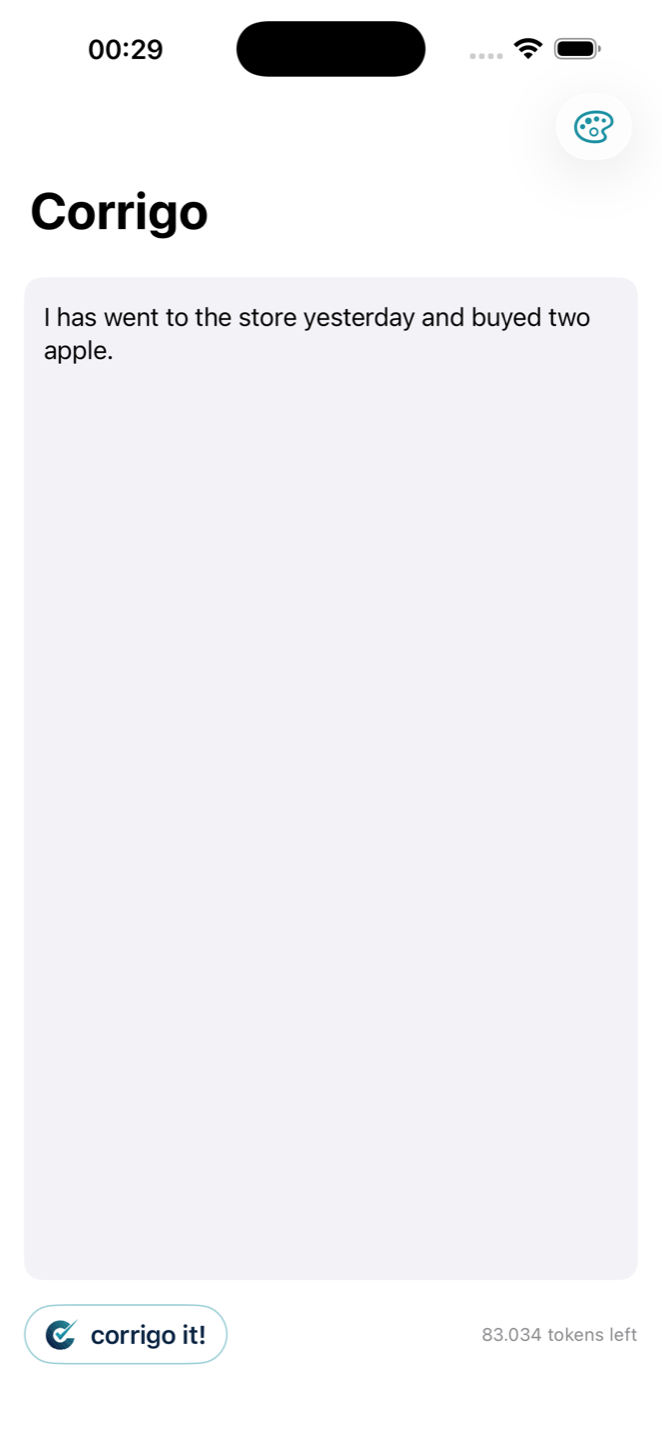
Write, then corrigo it!

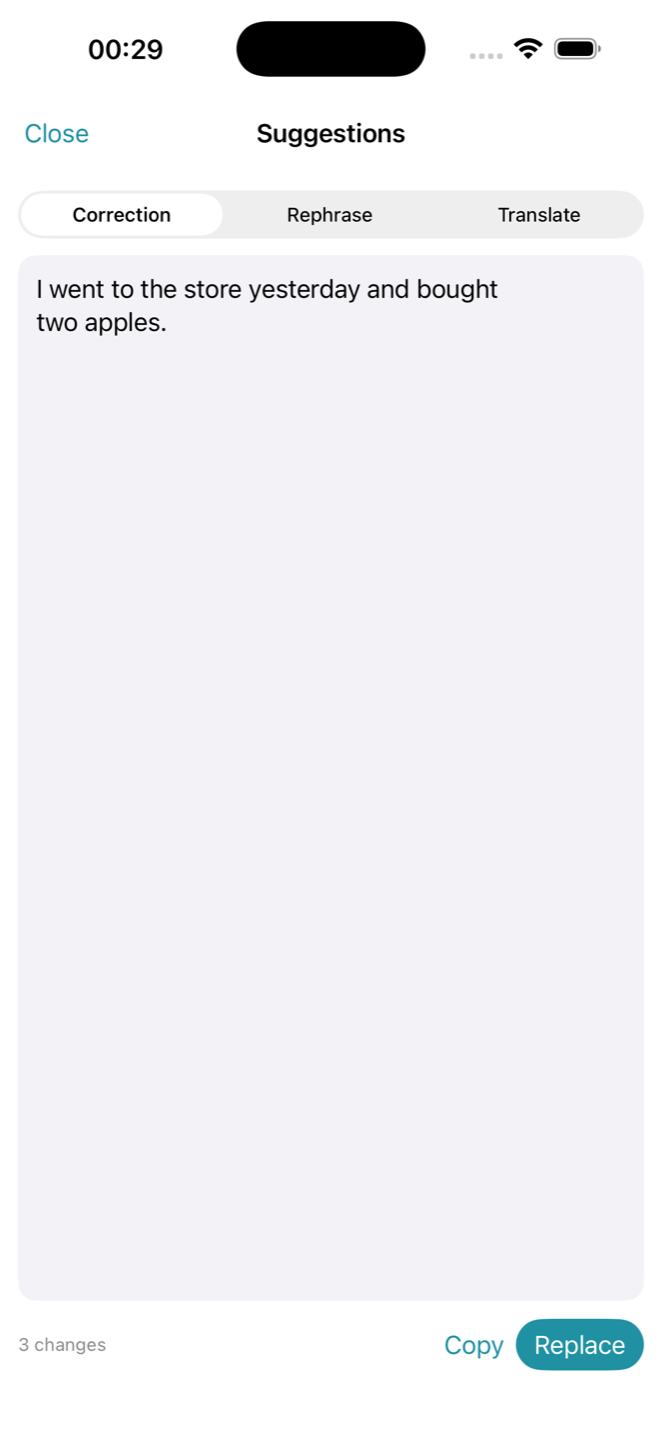
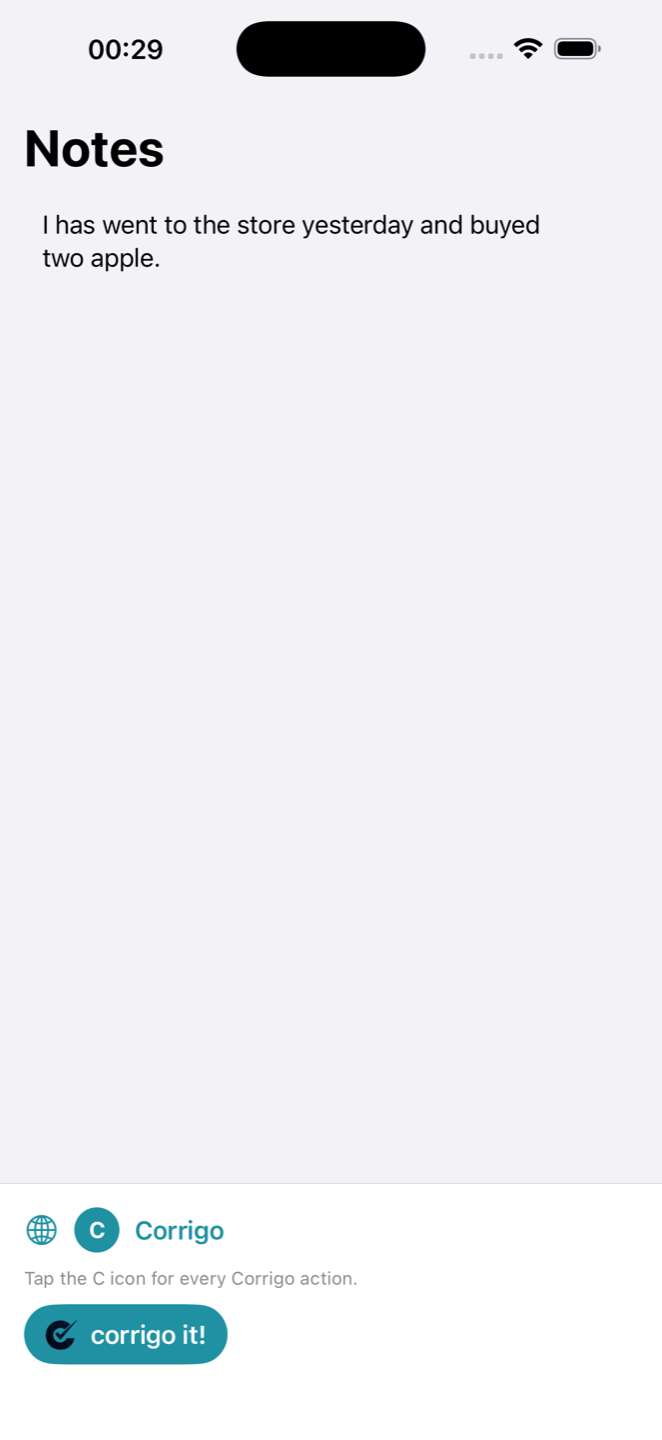
Draft in the Editor, or stay in Messages, Mail, or Notes. One tap sends the sentence for Correction, Rephrase, or Translate.

03

Correction

See each change, then replace the original with one tap. The fixed sentence drops back into the field you were already in.

04

Rephrase

Pick a tone — Neutral, Professional, Concise — and drop a cleaner version into the same thread.

05

Same account

Sign in with the email you already use on Mac and Windows. Tokens and history follow you.

06

A C icon on the keys

Tap C for every Corrigo action. The App Store listing is next — these are the screens that will ship.
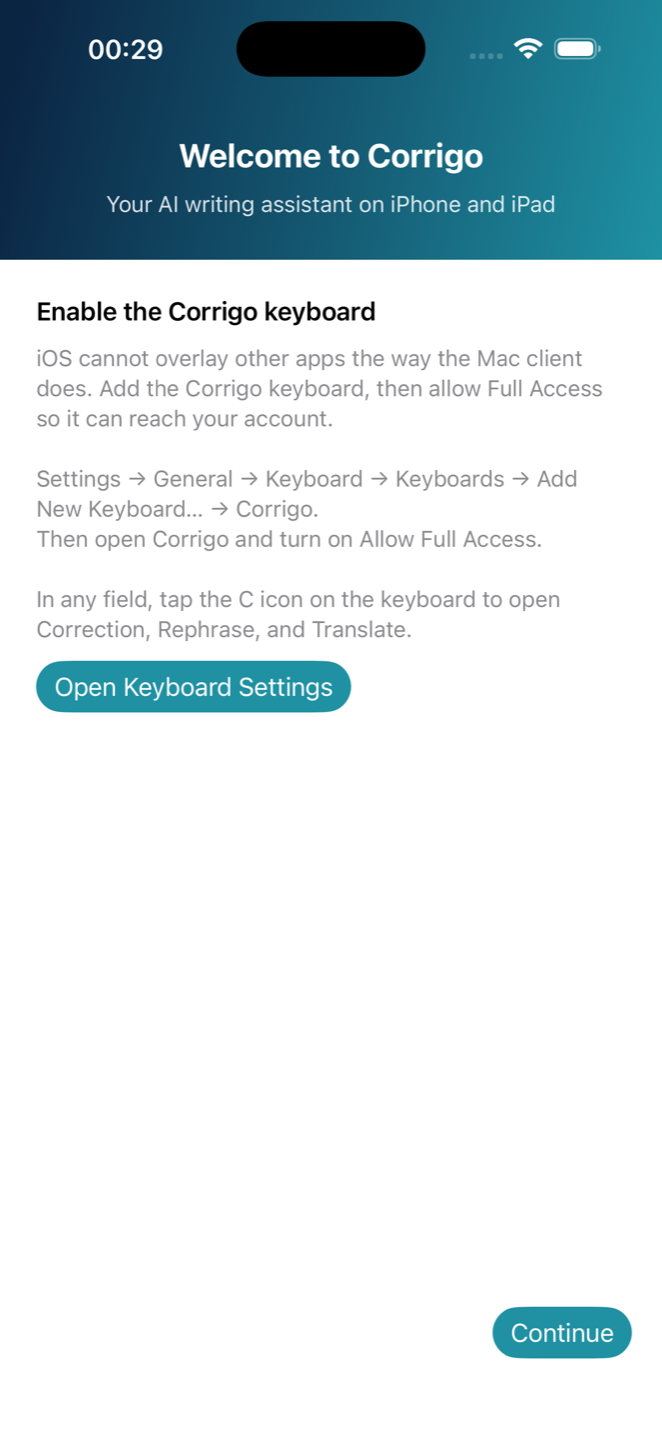
Onboarding: enable the Corrigo keyboard on iPhone
iPhone Editor with the corrigo it! button
Correction suggestions on iPhone
Rephrase tones on iPhone
Account and usage on iPhone Settings
Corrigo keyboard with the C icon above the keys
Download Android APKApp Store coming soon